

Let’s be real. Our iPads are basically mini computers now (well, at least mine is). From creative apps to productivity tools and mindfulness platforms, there are tons of options. I’ve tried a bunch recently (and not so recently, since I've been using some for literally 5 years 🙈), and here’s my honest take on the best iPad apps in 2026. In this list I’ll cover Lake, Notion, Procreate, GoodNotes, Calm, Canva, and GrainTouch.
TL;DR for the friends who hate reading long stuff:
- Lake Coloring: Best for creative, relaxing coloring. Free, supports real artists, perfect for mindfulness.
- GrainTouch: Great for textured digital art.
- Canva: Easy design app for social media, posters, and quick projects.
- Notion: Organize your life with notes, tasks, and projects.
- Procreate: Digital art powerhouse for making original drawings.
- GoodNotes: Handwriting, doodles, PDFs, and note organization.
- Calm: Guided meditation and chill time.
1. Lake Coloring: Creative Chill Time
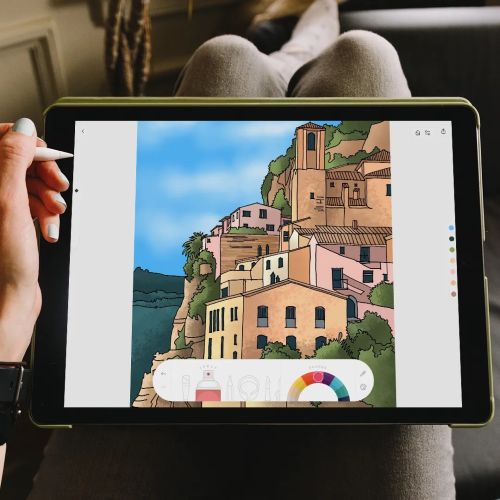
Yes, I work for Lake, but I also genuinely use it all the time (pinky swear!). This is not just a coloring app. It’s basically a mini creative escape you can carry in your pocket. I LOOOOOVE IT!
Why I love it:
- Every illustration is made by real artists, not AI (you can get to know some of them here)
- ASMR brush sounds make coloring feel surprisingly relaxing
- Unlimited color palettes and different art styles keep things fun
- Designed for mindfulness and stress relief while building a creative habit
Lake is perfect if you want to chill, get creative, and support artists at the same time. Even just five minutes can totally reset your brain.
2. GrainTouch: Texture‑Rich Digital Art
GrainTouch is an art app that focuses on natural media textures and expressive drawing. It feels great on iPad and gives a more organic look to digital sketches and paintings.
Why it is great:
- Lots of textured brushes that feel like real media
- Works beautifully with Apple Pencil
- Perfect for artists who want expressive, tactile results
Not ideal for:
- People who want pre‑made templates or coloring pages
- Users looking for structured lessons or animation tools
3. Canva: Design Made Easy
Canva is one of the easiest ways to make cool designs on your iPad. It’s perfect for social media graphics, posters, or just fun creative projects.
Why it is great:
- Tons of templates and design tools
- Drag-and-drop interface makes it beginner-friendly
- Great for social media, presentations, and more
Downsides:
- Free version has some limitations
- Less focused on mindfulness or relaxation
4. Notion: Productivity Made Flexible
Notion is basically a blank canvas for organizing your life. Notes, to-dos, projects, you can do it all here. For all my type A besties! 🤝
Why it is great:
- Totally customizable for whatever your workflow looks like
- Combines notes, databases, and calendars all in one
Downsides:
- Can feel a bit overwhelming if you are new
- Takes some time to figure out all the advanced features
5. Procreate: For When You Wanna Create
If you like drawing or want to try digital art, Procreate is the place to be. It’s popular among pros, but beginners can get creative too. This one is more for my type B friends 😉
Why it’s awesome:
- Powerful brushes and layer tools
- Apple Pencil support makes it feel natural
- Perfect for original artwork
Not great for:
- People who just want pre-made templates or casual coloring
- Anyone looking for a chill mindfulness app rather than full-on art creation
6. GoodNotes: Notes That Make Sense
GoodNotes is still the best for digital note-taking. If you like handwriting, doodling, or organizing your thoughts neatly, this is the one.
Why it is solid:
- Handwriting recognition actually works
- Super easy to organize notebooks and folders
- Great for PDFs and collaborating with others
Limitations:
- Not much for creativity outside note-taking
- Mainly a productivity tool, not a chill app
7. Calm: Chill and Meditate
Calm is perfect if you want guided meditations, breathing exercises, or bedtime stories. It’s basically like a mental spa in app form.
Why it works:
- Really helps with stress and mindfulness
- Tons of meditation styles and lengths
- Nice, clean, calming design
Downsides:
- Subscription required for most content
How I Pick Apps
When picking apps for your iPad, think about what you actually want to do:
- Chill vs. work: Do you want to be productive, creative, or just relax?
- Easy vs. deep: Do you want something you can open and use instantly or are you ready to dive into something more complex?
- Long-term fun: Will you still be using it next week or next month?
My best iPad apps in 2026 cover productivity, creativity, and chill time. Notion and GoodNotes are awesome for organizing your life, Procreate is perfect for making original art, Calm is great for guided relaxation, Canva is excellent for quick design projects, GrainTouch is amazing for natural vibes, and Lake comes out on top for creativity and mindfulness.